Error: Payment must be greater (Set Payment + Credit)
Cause
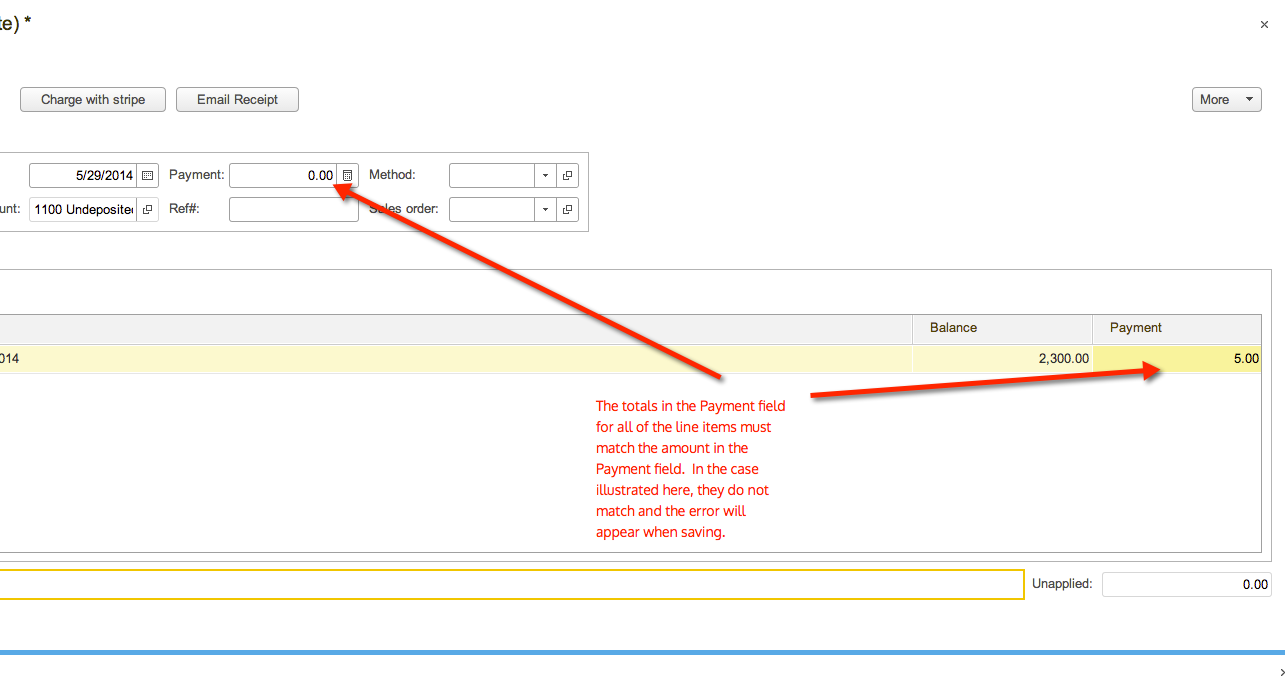
This error occurs sometimes on Cash Receipts if the total payment in the header doesn't match the applied amounts on the line items. The screenshot below illustrates the situation when this error would occur.
Solution
Change the amount in the Payment field in the header to match the sum of the totals in the line items.
Need help applying this to your business?
See how CustomBooks™ can support your accounting and inventory workflow
If you are evaluating CustomBooks™ or want help setting up workflows for your business, explore the product or schedule a conversation with our team.
Already using CustomBooks™? Explore the Knowledge Base or contact support for product help.
Related Articles
Paya: Processing Payment via ACH and Credit Card
Overview Paya enables you to securely process customer payments in CustomBooks™ using credit cards and ACH (bank transfers). This integration allows you to accept payments directly from invoices, sales orders, or manually through cash receipts and ...Setting Up Early Payment Discount
How do I set up the early payment discount and days to discount in payables (Bill Payments) and receivables (Cash Receipts)? To use the early payment discount feature, it must first be enabled in the Admin Panel under General Settings. Once enabled, ...Payment Method
Payment Method in CustomBooks™ A Payment Method refers to the type of transaction or instrument used to settle financial obligations, such as paying a bill, invoice, or receiving payments from customers. It specifies how the payment is made, whether ...Payment Terms in CustomBooks™
Payment Terms Payment Terms are the agreed-upon conditions between a buyer and seller that specify when a payment for goods or services is due. These terms define the period within which payment must be made, any early payment discounts, and ...Cloud Banking Error Code Reference
Error Codes Here are a list of common issues found in Cloud Banking and the action to take if you see this in your account. Error Code Description Error Message in Cloud Banking What you can do 400 Technical Issue We’re sorry, your request could not ...